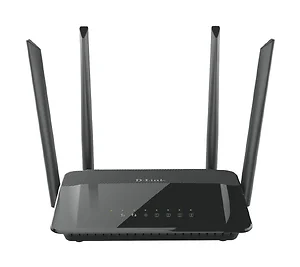
The AC1200 Wi-Fi Router delivers high performance wireless speed and coverage through your home. Use the 2.4 GHz band for everyday tasks, while leaving the high-speed 5 GHz AC band free for HD video streaming, online gaming and large file transfers. With fewer devices using the high-speed 5 GHz band, there?s less interference and congestion, giving you better performance and a lag-free wireless experience. It delivers up to 1,200 Mbps1 (300 Mbps in 2.4GHz + 867 Mbps in 5GHz ) in combined Wi-Fi speed. It comes with Intelligent Quality of Service (QoS) with traffic prioritization, four high-performance external antennas for maximum range, a new user interface with an easy setup. The DIR-822 is the perfect combination of performance and ease of use.
Technical Specifications
New User Interface Controlling your network by enabling parental controls, blocking unwanted devices, monitoring internet activity and creating Wi-Fi guest networks is easier than ever with our new interface.
Additional Features 11AC Wi-Fi - Fast Wi-Fi speeds of up to 300Mbps (2.4GHz) + 867Mbps (5GHz). 10/100 Fast Ethernet Ports - Connect up to 4 wired devices for ultra fast HDstreaming and online gaming. 10/100 Fast Ethernet Ports - Connect up to 4 wired devices for ultra fast HDstreaming and online gaming. Whole-Home Coverage 11AC technology extends wireless range further than with Wireless N. High-Powered Antennas 4 external antennas amplify wireless signal. Traffic Prioritization Advanced QoS engine distributes traffic optimally across both wireless bands to guarantee the best performance. Dual-Band Technology Decreases wireless interference and congestion, allowing you to connect more devices. Parental Controls Create online access schedules and block/allow specific websites and/or devices. Guest Wi-Fi Network Enable a public or encrypted wireless guest network. Secure Wi-Fi Encryption WPA/WPA2 provides highest level of wireless security. Easy To Install Installation wizard manually walks you through setup in minutes. Quick Router Setup (QRS) App Easy setup app for smartphones and tablets. WPS Push Button Setup Quickest method of connecting devices with the push of a button.
Device Interfaces IEEE 802.11 ac/n/g/b/a wireless LAN 10/100/1000 Gigabit Ethernet WAN port Four 10/100/1000 Gigabit Ethernet LAN ports LEDs Power Internet WLAN LAN (x4) WPS Antenna Type Four external antennas Operating Frequency 2.4 GHz band: 2400 - 2483.5 MHz 5 GHz band: 5150 - 5725 MHz Standards IEEE 802.11ac IEEE 802.11n IEEE 802.11g IEEE 802.11b IEEE 802.11a IEEE 802.3u Minimum Requirements Windows 8/7/Vista/XP SP3, or MAC OS X 10.6 or higher Internet Explorer 9, Firefox 20.0, Chrome 25.0, Safari 5.1, or other Java-enabled browser Network interface card Cable or DSL Modem Subscription with an Internet service provider Security WPA and WPA2 (Wi-Fi Protected Access) WPS (Wi-Fi Protected Setup) Advanced Features Web setup wizard QoS (Quality of Service) DMZ (De-militarized Zone) Firewall - Network Address Translation (NAT) Guest Zone IPv6-Ready Power Adaptor Input: 100 to 240 V AC, 50/60 Hz Temperature Operating: 0 to 40oC (32 to 104oF) Storage: -20 to 65oC (-4 to 149oF) Humidity Operating: 10% to 90% non-condensing Storage: 5% to 95% non-condensing Certifications CE RoHS LVD BSMI NCC FCC D-Link Green CSA CCC Item Dimension (L inchxW inchxH inch) 8 x 5 x 1