29+Years
29+Years
29+Years
85 Available
Condition: New

Keep your audience engaged with your presentation
When you deliver a presentation, your goal is to engage with your audience, not your computer. But, if you don't move yourmouse soon enough, or change your power settings, your screen goes black due to inactivity while you're addressing the audience. This can be a major distractionwhen you're trying to focus on the message you're communicating.
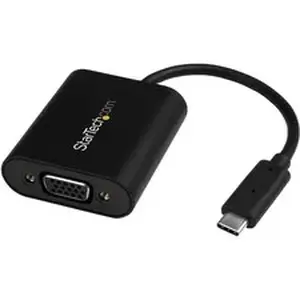
This adapter prevents screen disruptions with Presentation Mode, a unique feature that automatically initiates occasional cursor movement to prevent your computer's power settings from interrupting your presentation. It's perfect for sharing websites, drawings, spreadsheets, PDFs or slide shows during your meeting.
Turn Presentation Mode on or off
You can turn Presentation Mode on or off, depending on your application. Turn it on when you're in the boardroom and want your screen to stay on, and turn it off when you're using the adapter at your workspace or office desk, to enableyour computer's original power settings to take effect. Using the toggle switch is easy, and saves you the hassle of constantly making adjustments in your operating systemsettings.
Hassle-free setup and operation on Mac and PC
To ensure easy operation and installation, this unique adapter is natively supported on Windows® and Mac computers. It's easy to connect the adapter using the versatile USB Type-C™ port on your computer. The reversible USB-C connector means you will always plug it in correctly on your first try, saving you the hassle and distraction of repeatedly attempting to connect your laptop to a display or projector.
Crystal-clear picture quality
The adapter supports video resolutions up to 1920x1200 or 1080p. You'll be surprised at the picture quality the adapter provides, even when you connect it to a legacy VGA projector or television. The adapter harnesses the video capabilities that are built into your USB Type-C connection to deliver every detail in stunning high-definition.
The CDP2VGASAis backed by a 3-year StarTech.com warranty and free lifetime technical support.
More from the Manufacturer
Packaged Quantity:1 Each
Product Type:Video Adapter


CDP2VGASA - Startech USB C to VGA TAA