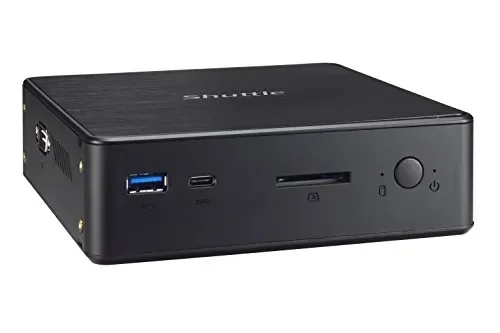
Shuttle comes with Intel Kaby lake-U Core i7 CPU and has two DDR4 SODIMM slots to support a maximum of 32GB.
Technical Specifications
Chassis Barebone PC with a black plastic chassis Hole for Kensington Lock Includes vertical stand and 75 / 100 mm VESA mount Low Power Consumption Power consumption in idle mode under Windows 10: ca. 5 W Operation Position 1) Horizontal 2) Vertical with stand 3) VESA-mounted behind an appropriate monitor Operation System This barebone system comes without operating system. It is compatible with: - Windows 10, 64-bit - Linux, 64-bit Processor Model: Intel Core i7-7500U (ULV) System-on-a-chip architecture (SoC): no chipset required BGA1356 package - directly soldered onto the mainboard Code name: Kaby Lake-U (7th Generation Intel Core) Cores / Threads: 2 / 4 Clock rate: 2.7-3.5 GHz L1/L2/L3 Cache: 128 kB / 512 kB / 4096 kB Memory controller: DDR4-2133 Dual Channel (1.2 V) TDP wattage: 15 W maximum Manufacturing process: 14 nm Maximum Tjunction Temperature: 100 oC Supports Hyper-Threading (HT), 64-bit, VT-x (EPT), VT-d, Enhanced SpeedStep, NX bit, AES-NI, SSE 4.1/4.2 Integrated graphics engine Cooling Fan Built-in CPU cooling fan with 4-pin connector Supports temperature-controlled RPM fan speed Integrated Graphics Intel HD graphics 620 GPU clock frequency: 300-1050 MHz Execution Units (EUs): 24 Two digital audio/video ports support two independent screens (dual monitoring): Supports Ultra HD / 4K resolution at 3840 x 2160 Pixels 1) DisplayPort 1.2 supports Ultra HD at 60 Hz 2) HDMI 1.4b supports Ultra HD at 30 Hz Mainboard / BIOS AMI BIOS in 8 MByte EEPROM with SPI interface Supports resume after power failure Supports Wake on LAN (WOL) Supports Power on by RTC Alarm Supports booting from USB devices and SD card reader Supports hardware monitoring and watch dog function Supports Unified Extensible Firmware Interface (UEFI) Supports Firmware TPM v2.0 (fTPM) Power Adapter External 65 W power adapter (fanless) Input: 100-240 V AC, 50/60 Hz, max. 1.6 A Output: 19 V DC, max. 3.42 A, max. 65 W DC Connector: 5.5 / 2.5 mm (outer/inner diameter) Memory support 2x SO-DIMM slots with 260 pins Supports DDR4-2133 (PC4-17000) SDRAM at 1.2 V Supports Dual Channel mode Supports a maximum of 16 GB per DIMM, maximum total size: 32 GB Supports two unbuffered DIMM modules (no ECC or registered) 2.5" Drive Bay Supports one Serial ATA hard disk or one SATA SSD drive in 6.35 cm / 2.5" format Device height: 15 mm (max.) Supports Serial-ATA III, 6 Gb/s (600 MB/s) bandwidth Card Reader Integrated SD card reader Supports SD, SDHC and SDXC memory flash cards Supports booting from SD card M.2 Slot for SSDs The M.2 2280 BM slot provides the following interfaces: - PCI-Express Gen. 2.0 X4 with up to 32 Gbps Data Transfer Speed - SATA v3.0 (max. 6 Gbps) It supports M.2 cards with a width of 22 mm and a length of 42, 60 or 80 mm (type 2242, 2260, 2280). Supports M.2 SATA SSDs (with B+M key) and M.2 PCIe SSDs (with M key) Audio Audio Realtek ALC 662 High-Definition Audio Codec 3.5 mm / 4-pole combo audio connector for headphones and microphone Digital multi-channel audio output: via HDMI and DisplayPort Gigabit LAN Ethernet Controller Intel i211 Supports 10 / 100 / 1.000 MBit/s operation (Gigabit) Supports WAKE ON LAN (WOL) Supports network boot by Preboot eXecution Environment (PXE) IEEE 802.3az Energy Efficient Ethernet (EEE) Interface: PCIe v2.1 Front Panel connectors USB 3.0 type A USB 3.0 type C SD card reader (supports SD, SDHC, SDXC) Power button Power LED (blue, flashing when in suspend mode) HDD LED (orange) Back Panel connectors DisplayPort 1.2 HDMI 1.4b 2x USB 2.0 Gigabit LAN (RJ45) Audio Combo Port for headphones and microphone (3.5 mm jack, 4-pole) DC-input connector for external power adapter 2x perforation for optional external WLAN antennas Left Side connectors Serial RS232 COM port (D-Sub, 9-pin) Note: The serial connector (COM port) cannot be used if the NC03U7 is operated in vertical position. Always-On Jumper By removing Jumper JP1 (please refer to the Quick Installation Guide) the system will start unconditionally once power is applied. Clear CMOS Jumper Short Jumper JP2 for about 10 seconds to restore factory settings of BIOS.