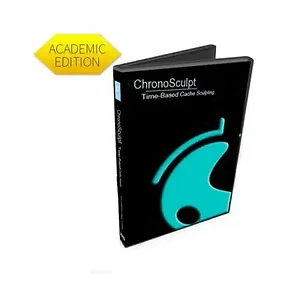
LW-CS10EF - Lightwave ChronoSculpt 1.0 - Academic ESD License | Aztek Computers
29+Years
SKU: NN5NH8F2XH |  Mfg. Part: LW-CS10EF  | 
 1 Reviews
 |     Share

LW-CS10EF - Lightwave ChronoSculpt 1.0 - Academic ESD License

Special Order
Ships in 1-2 weeks
Condition: New

$174.41 
Free Shipping for this Item

Product Overview

ChronoSculpt is an innovative stand-alone application designed to enhance the workflow of animation and dynamic simulation cache files, enabling users to apply sculpting and transformation tools over time. With its cutting-edge geometry engine based on Hydra technology, ChronoSculpt allows for effortless manipulation of objects containing up to 10 million polygons.

This application supports industry standards such as Alembic, LightWave MDD, and Autodesk Geometry Cache formats, allowing artists to easily correct errors in dynamic simulations or alter the appearance of characters through layered sculpting clips or global adjustments across the entire animation.

ChronoSculpt can significantly reduce workflow inefficiencies, enabling quick modifications to baked dynamic simulation cache files to eliminate simulation jitters and artifacts, leading to timely project deliveries.

Expert Overview

The Lightwave ChronoSculpt 1.0 Academic ESD License (LW-CS10EF) is a standalone application designed for manipulating animation and dynamic simulation cache files. It enables users to apply sculpting and transformation tools directly over time, addressing common issues like simulation jitters and artifacts. This software is suitable for academic users who need to refine baked dynamic simulations or modify character appearances within animation workflows. Its geometry engine, based on Hydra technology, supports objects up to 10 million polygons, facilitating the handling of complex scenes. ChronoSculpt integrates with industry-standard formats including Alembic, LightWave MDD, and Autodesk Geometry Cache, allowing for efficient error correction and aesthetic adjustments. By providing tools to sculpt, drag, pinch, erase, transform, pin, and bulge geometry over time, it helps reduce workflow inefficiencies and supports timely project deliveries in animation and simulation pipelines.

Technical Specifications

  • Revolutionary Time Sculpting: Seamlessly remove dynamics simulation errors and jitters while sculpting deformations on cache files from various 3D software programs.
  • Sculpting Tools: Utilize cutting-edge tools like sculpt, drag, pinch, and erase to manipulate geometry over time.
  • Transform Tools: Edit individual geometry within a dynamic simulation cache using tools such as Transform, Pin, and Bulge for efficient project completion.
  • Enhanced Geometry Engine: Effortlessly handle vast geometry files, supporting objects with up to 10 million polygons.
  • Universal File Support: Compatible with LWO, OBJ, LightWave MDD, Autodesk Geometry Cache, and Alembic for streamlined integration into any software pipeline.
  • OBJ Blend Shape and Endomorph Export: Save any frame from the ChronoSculpt timeline as an OBJ for Maya Blend Shapes or as an Endomorph for LightWave to create facial morph targets and deformation effects.
  • Clip Timeline: Quickly reposition and adjust the length of sculpting clips in the timeline to perfect animation effects or apply global changes.

Product Details

  • Manufacturer:
  • Model Number:
  • Condition:
  • Weight:
  • Dimensions:
  • Updated:
  • Added:
  • Lightwave
  • LW-CS10EF
  • New
  • 1 lbs
  • 5 X 5 X 5
  • Feb 19, 2026
  • Feb 23, 2022
Product Identifiers: Brand: Lightwave • Part #: LW-CS10EF • Category: Lenses

Frequently Asked Questions

What file formats does ChronoSculpt 1.0 support for import and export?

ChronoSculpt 1.0 supports LWO, OBJ, LightWave MDD, Autodesk Geometry Cache, and Alembic formats for integration into various software pipelines. It can also export any frame as an OBJ for Maya Blend Shapes or as an Endomorph for LightWave.

What is the maximum polygon count ChronoSculpt can handle?

The enhanced geometry engine in ChronoSculpt 1.0 is designed to effortlessly handle vast geometry files, supporting objects with up to 10 million polygons.

What types of sculpting and transformation tools are included?

The software includes sculpting tools such as sculpt, drag, pinch, and erase. Transformation tools available are Transform, Pin, and Bulge, which can be used to edit individual geometry within a dynamic simulation cache.

What is the primary use case for ChronoSculpt?

ChronoSculpt is primarily used to enhance animation and dynamic simulation workflows by enabling users to correct errors like jitters and artifacts in baked cache files, or to alter the appearance of characters and objects through layered sculpting clips and global adjustments over time.

LW-CS10EF - Lightwave ChronoSculpt 1.0 - Academic ESD License

Confirm you're human, then submit:

Reviews for Lightwave LW-CS10EF

$174.41