29+Years
29+Years
29+Years


Special Order
Ships in 1-2 weeks
Condition: New
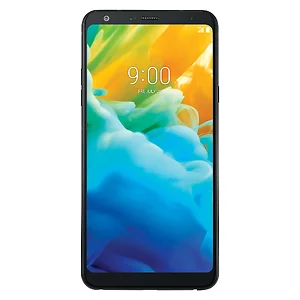
The Stylo 4 32GB Smartphone from LG is designed with features and capabilities to maximize your mobile experience. The large 6.2" FHD+ FullVision display delivers a resolution of 2160 x 1080, giving you cinematic visuals for movies and gaming. From this canvas you can utilize the integrated stylus for precise navigation and control within apps, whether it's for drawing, jotting notes, or editing video.
The Stylo 4 also features some impressive photography features that let you capture your life and the world around you in stunning detail. The rear 13MP camera can capture still images with resolutions up to 4160 x 3120, as well as Full HD 1080p video. The front 5MP camera can record 1080p video too, in addition to still photos with resolutions up to 2560 x 1920.
Running the Android 8.1 Oreo operating system, this phone is powered by a 1.8 GHz Octa-Core processor and 3GB of RAM. You can store your apps, hi-res images, HD videos, and hand-written notes on 32GB of built-in storage, which can be expanded via an (optional) microSD card up to 2TB in size.
This phone is unlocked and compatible with GSM+CDMA/4G LTE networks. Connect to the internet and other devices with built-in 802.11 a/b/g/n/ac Wi-Fi and Bluetooth 4.2. The Stylo 4 also supports Wi-Fi Direct technology for making direct phone-to-phone data transfers without the need of a computer.
LG mobile switch gives you the freedom to migrate data from any android or iOS device to a new LG phone. The LG Mobile Switch (Sender) app must be installed on the old and new phone to transfer contacts, text messages,
LG Bridge brings all your LG devices (phones and tablets) together. You can manage, update, and back up your devices all in one place. Use LG Bridge to: LG Backup - Back up or restore content on your mobile device via USB Software.
LG PC Suite brings all your LG devices (phones and tablets) together. You can manage, update, and back up your devices all in one place. Use LG PC Suite to:Send multimedia content to your device.Update the software in your
Note: Some Settings, Menus, or Icons may differ from that of your device depending on your software version and wireless service provider. Download Drivers and Software Copy/Backup Photos and VideosLG Universal Mobile
Create/Restore Backup (Oreo) Create/Restore Backup (Nougat) Backup Using LG Bridge FAQs LG Backup can backup your mobile devices LG Home screen, device settings, apps, and contacts to your computer. Note: Some Settings,
This issue can be attributed to many different factors. Often times a simple reset of your device will clear up issues that are causing your device to freeze or become unresponsive.Soft Reset Factory Reset Rear Power Button Side
LGQ710ULM - Lg Electronics Stylo 4 32GB Unlocked Black