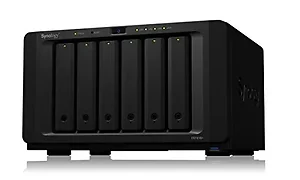
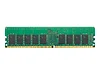
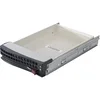
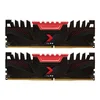
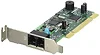
General InformationUser-oriented server with high-speed computing DS1618+ is a 6-bay NAS that provides storage scalability perfect for tech enthusiasts and small- to medium-sized businesses by effortlessly handling workloads. Further boost storage performance with the optional M.2 SSD cache or enhance network speeds by adding a 10 GbE NIC. Supercharge your storage with speedy performance DS1618+ comes with a PCIe expansion slot to support add-in cards. Install a dual M.2 SSD card for high-IOPS system caching or a 10GbE NIC for ultra-fast data transmission. M2D17 Dual M.2 SATA SSD slot, compatible with 2280/2260/2242 form factors 10GbE 10GbE network capacity for intensive bandwidth environments Engineered for reliability, backed by Synology DS1618+ is designed to reliably store your data and is backed by Synology's three-year hardware warranty. An optional two-year extended warranty is available in select regions for up to five years of coverage. Ultimate file management and sharing File Station is a web-based, fast and secure management tool built to allow easy, drag-and-drop operation without requiring any complex setup on Mac or PC. Advanced search and filtering tools allow for easy organization and sharing of files with just a link. Supports SMB, FTP, AFP, NFS, WebDAV, compatible with any environment. Real-time collaboration on your private cloud Office is a collaboration package combining the convenience and usability of public clouds with the data privacy and security guaranteed by private clouds. It allows you to work seamlessly together on documents and spreadsheets in a protected environment. Ultimate Backup Solution DS1618+ integrates various backup applications to safeguard your important data on any device with an intuitive user interface and durable storage technologies. Active Backup for Server An agentless backup solution protects data from Windows and Linux servers through SMB and Rsync to minimize deployment and management costs. Hyper Backup Comprehensively back up your data to a local shared folder, an external device, another Synology NAS, an rsync server, or a public cloud to ensure data safety. Desktop Backup Safeguard your PC with Cloud Station Backup. Effortlessly back up data stored on macOS to Synology NAS with Time Machine. Active Backup for Office 365/ G Suite Protect corporate data stored on the cloud. On-premise backup solution with a centralized dashboard. Optimize storage efficiency with single instancing and block-level deduplication technology. Btrfs: Next generation storage efficiency Btrfs file system introduces the most advanced storage technologies to meet the management needs of modern large scale businesses: Flexible Shared Folder/User Quota System provides comprehensive quota control on all user accounts and shared folders Snapshot Replication provides schedulable and storage capacity-saving data protection with 1,024 shared folder backups and 65,000 system-wide snapshots File or folder level data restoration makes data recovery fast and flexible Automatic file self-healing detects and recovers corrupted files without user intervention StorageNumber of Hard Drives Supported: 6Number of Hard Drives Installed: NoNumber of Solid State Drive Supported: 6Number of Solid State Drive Installed: NoProcessor & ChipsetProcessor Manufacturer: IntelProcessor Type: AtomProcessor Model: C3538Processor Core: Quad-core (4 Core)Processor Speed: 2.10 GHz
Technical Specifications
CPU CPU Model Intel Atom C3538 CPU Architecture 64-bit CPU Frequency Quad Core 2.1 GHz Hardware Encryption Engine (AES-NI) Yes Memory System Memory 4 GB DDR4 Memory Module Pre-installed 4GB (1 x 4GB) Total Memory Slots 2 Memory Expandable up to 32 GB (16 GB x 2) Storage Drive Bays 6 Maximum Drive Bays with Expansion Unit 16 Compatible Drive Type 3.5" SATA HDD 2.5" SATA HDD 2.5" SATA SSD Maximum Internal Raw Capacity 72 TB (12 TB drive x 6) (Capacity may vary by RAID types) Maximum Raw Capacity with Expansion Units 192 TB (12 TB drive x 16) (Capacity may vary by RAID types) Maximum Single Volume Size 108 TB Hot Swappable Drive Yes Notes "Compatible drive type" indicates the drives that have been tested to be compatible with Synology products. This term does not indicate the maximum connection speed of each drive bay. The maximum raw capacity is not limited by the maximum single volume size. Synology NAS models may utilize capacities over the maximum single volume size as long as each volume created is below the limit. Expansion of the internal volume is only supported if the combined single volume size does not exceed the maximum limit of 108TB or 200TB if upgraded to 32GB RAM or more. External Ports RJ-45 1GbE LAN Port 4 (with Link Aggregation / Failover support) USB 3.0 Port 3 eSATA Port 2 PCIe PCIe Expansion 1 x Gen3 x8 slot (black, x4 link) Add-in-card support M2D17 - Dual M.2 SSD adapter card for SSD cache M2D18 - Dual M.2 SATA/NVMe SSD adapter card for SSD cache PCIe Network Interface Card
Note1: DS1618+ with M2D17 can only support M.2 SATA SSD. M.2 NVMe/AHCI PCIe SSD is not supported. File System Internal Drives Btrfs EXT4 External Drives Btrfs EXT4 EXT3 FAT NTFS HFS+ exFAT Notes exFAT Access is purchased separately in Package Center. Others System Fan 92 mm x 92 mm x 2 pcs Fan Speed Mode Full-Speed Mode Cool Mode Quiet Mode Easy Replacement System Fan Yes Brightness adjustable front LED indicators Yes Power Recovery Yes Noise Level 23.7 dB(A) Scheduled Power On/Off Yes Wake on LAN/WAN Yes Power Supply Unit / Adapter 250W AC Input Power Voltage 100V to 240V AC Power Frequency 50/60 Hz, Single Phase Power Consumption 56.86 W (Access) 25.76 W (System Hibernation) British Thermal Unit 194.01 BTU/hr (Access) 87.9 BTU/hr (System Hibernation) Environment Temperature Operating Temperature 0oC to 40oC (32oF to 104oF) Storage Temperature -20oC to 60oC (-5oF to 140)oF Relative Humidity 5% to 95% RH Certification FCC CE BSMI EAC VCCI CCC RCM Notes Power consumption is measured when fully loaded with Western Digital 1TB WD10EFRX hard drive(s). Noise Level Testing Environment: Fully loaded with Seagate 2TB ST2000VN000 hard drive(s) in idle Two G.R.A.S. Type 40AE microphones, each set up at 1 meter away from the Synology NAS front and rear Background noise: 16.49 to 17.51 dB(A) Temperature: 24.25 to 25.75oC Humidity: 58.2 to 61.8% Storage Management Maximum Internal Volume Number 512 Maximum iSCSI Target Number 128 Maximum iSCSI LUN 256 iSCSI LUN Clone/Snapshot, Windows ODX Yes SSD Read/Write Cache (White Paper) Yes SSD TRIM Yes Supported RAID Type Synology Hybrid RAID Basic JBOD RAID 0 RAID 1 RAID 5 RAID 6 RAID 10 RAID Migration Basic to RAID 1 Basic to RAID 5 RAID 1 to RAID 5 RAID 5 to RAID 6 Volume Expansion with Larger HDDs Synology Hybrid RAID RAID 1 RAID 5 RAID 6 Volume Expansion by Adding a HDD Synology Hybrid RAID RAID 5 RAID 6 JBOD Global Hot Spare Supported RAID Type Synology Hybrid RAID RAID 1 RAID 5 RAID 6 RAID 10 File Sharing Capacity Maximum Local User Accounts 2048 Maximum Local Groups 256 Maximum Shared Folder 512 Maximum Shared Folder Sync Tasks 8 Maximum Concurrent CIFS/AFP/FTP Connections 1000 Maximum Concurrent CIFS/AFP/FTP Connections (with RAM expansion) 2000 Windows Access Control List (ACL) Integration Yes NFS Kerberos Authentication Yes High Availability Manager Yes Log Center Yes Syslog Events per Second 800 Virtualization VMware vSphere 6 with VAAI Yes Windows Server 2016 Yes Citrix Ready Yes OpenStack Yes Antivirus by McAfee (Trial) Yes Central Management System Yes Chat Yes Maximum Users 1500 Notes The number of concurrent HTTP connections for Chat was configured to the maximum. CPU and RAM usage were both under 80% when the number of maximum users was reached. For tested models with expandable memory, the maximum amount of RAM was installed. Cloud Station Server Yes Maximum Number of Concurrently Connected Devices 1000 Maximum Number of Concurrently Connected Devices (with RAM expansion) 2000 Maximum Number of Hosted Files (btrfs) 1,000,000 Maximum Number of Hosted Files (ext4) 1,000,000 Notes The maximum number of concurrently connected devices refers to the maximum number of devices that can remain connected at the same time. The maximum number of hosted files refers to the maximum number of files that can be indexed and hosted by the Cloud Station Server service. RAM expansion was not used during testing. Non-encrypted shared folders were used during the aforementioned testing. Document Viewer Yes Download Station Yes Maximum Concurrent Download Tasks 80 Drive Yes Maximum Number of Hosted Files 1,000,000 Maximum Number of Concurrent Connections for PC Clients 550 Notes The Btrfs file system was used for the purpose of testing. For tested models with expandable memory, the maximum amount of RAM was installed. exFAT Access (optional) Yes