29+Years
29+Years
29+Years


Special Order
Ships in 1-2 weeks
Condition: New

11-11800H 16GB 512GB SSD 15.6IN W10
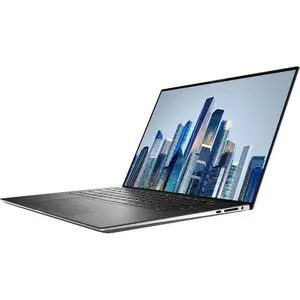
The 15.6" Precision 5560 Mobile Workstation from Dell is a thin, small, and light system that has been designed for AI and VR workloads. This laptop is powered by an 11th Gen 2.4 GHz Intel Core i7-11800H Quad-Core processor, which features a boost speed of up to 4.6 GHz and allows you to run multiple applications simultaneously. The 16GB of 3200 MHz DDR4 memory helps to ensure smooth multitasking and allows the computer to quickly access frequently used files and programs. Its 15.6" anti-glare display, driven by a dedicated NVIDIA RTX T1200 graphics card with 4GB of GDDR6 memory, has a 1920 x 1200 resolution, a 16:10 aspect ratio, a 1650:1 contrast ratio, a brightness of 500 cd/m2, and viewing angles of ±85/85°.
For storage of your files, there is a 512GB NVMe PCIe M.2 2280 SSD, as well as a second M.2 2280 slot for additional storage. If you'd like to connect external storage or devices such as optical drives, media card readers, printers, or scanners, the Precision 5560 has two Thunderbolt 4 ports and one USB 3.2 Gen 2 Type-C port, all of which support DisplayPort and Power Delivery. Connect to the internet via Wi-Fi 6 (802.11ax) and pair compatible wireless peripherals with Bluetooth 5.2 technology to free up the Thunderbolt and USB ports for more important devices. Other integrated features include an SD/SDHC/SDXC card reader, a user-facing 720p IR webcam with facial recognition that lets you log in using Windows Hello, dual 6W speakers, dual-array mics, and a 3.5mm mic/headphone jack.
Dell's 15.6" Precision 5560 Mobile Workstation can be powered using the included 130W USB Type-C adapter, or using the integrated 6-cell / 86Wh lithium-ion battery. The installed operating system is Windows 10 Pro (64-bit)
A 2.4 GHz Intel Core i7-11800H Quad-Core processor offers businesses the performance, manageability, built-in security features, and stability of Intel architecture.
Work with powerful applications like CAD and Adobe Creative Suite seamlessly, thanks to the impressive performance of an NVIDIA RTX T1200 graphics card with 4GB of GDDR6 memory.
Accelerate workflows and improve response time with 16GB of 3200 MHz DDR4 memory, which comes in a 2 x 8GB configuration and can be upgraded to 64GB by using a 32GB memory module in each of the 260-pin SO-DIMM slots.
Keep your designs local with 512GB of PCIe 3.0 x4 storage.
Experience seamless Wi-Fi. Express Connect automatically joins the strongest authenticated access points and allows you to direct the system's bandwidth to conferencing applications.
Collaborate like you're in the same room. Distortion reduction, background noise elimination, and broadcast-quality sound let you hear and be heard.
Launch your most used apps faster. Built-in AI and Intel Adaptix Technology adjust performance levels where you need them most.
The workstation proximity sensor enabled by Intel Context Sensing Technology detects your presence to instantly wake and log you in via the IR camera and Windows Hello. It locks upon walking away, so your work stays safe.
Dell Optimizer extends runtime and improves battery performance by adapting to your patterns. Express Charge Boost delivers up to 35% charge in about 20 minutes, or up to 80% charge in an hour with ExpressCharge.
Analyze your system and generate reports on workload, system performance, and system diagnostics for insights that help you create a personalized performance for the way you work.
The minimized footprint, borders, and bezels all add up to an enhanced viewing experience.
Work will never weigh you down with this lightweight laptop, weighing in at just 4.06 pounds.
A 92% display-to-body ratio gives you maximum screen and minimum footprint.
Comfort View Plus technology reduces eye strain day and night with always-on, TUV-certified low blue light panels.
A revolutionary cooling solution designed to help your most intensive programs run smoother than ever.
A larger touchpad helps your creations come to life with more freedom than ever.
Work easily with a 1.3mm travel distance, as well as a modern look and feel.
The camera placement lines up with your eyeline for natural, convenient conversations.
After its hiatus in Windows 8, the Start Menu has returned. Utilizing a combination of the traditional menu system and Windows 8's Live Tiles, the improved Start Menu gives you more information at a glance, showing notification information alongside your applications and other pinned items.
Microsoft's digital personal assistant, Cortana can answer your questions with information gleaned from both your device and the internet at large. You can type or even talk with her, if your system has a microphone. Using her Notebook, Cortana keeps track of your needs and wants, and she learns over time to improve her information gathering skills.
After nearly 20 years, Microsoft has finally replaced its Internet Explorer web browser. With Microsoft Edge, users can write directly on web pages and share notes with friends and colleagues. It also improves the online reading experience by adding a distraction-free mode and read-it-later functionality. Edge also has built-in Cortana integration; you can have her help you find a restaurant, make a reservation, and pull up directions without leaving your browser.
For Windows 10, Microsoft has unified the Windows Store. Now, apps for PCs, tablets, and phones will all be accessible from one place. And with support for Universal Apps, one version of an app can work across all your compatible devices automatically.
Windows 10 was designed for a variety of screen sizes and input styles, and with its Continuum feature, it automatically adapts to fit your needs. A Windows 10 tablet on its own requires a touch-centric approach, but attaching a mouse and keyboard will shift everything to a more traditional interface. You can even attach an external monitor to your Windows 10 phone for a near-desktop experience. But it's not just the operating system; Windows Universal Apps take advantage of Continuum as well.
Gaming is a big focus of Windows 10. Xbox integration allows for PC players to match up against Xbox One players on supported games, and if you have an Xbox One, you can even stream compatible titles to your PC. Native support for recording with the new Game DVR feature makes it easy to capture and share your gameplay. The new DirectX12 takes better advantage of multi-core processors, giving games a performance boost, even on older hardware. Windows 10 also features native support for virtual reality headsets, such as the Oculus Rift.
The Pro version of Windows 10 includes all of the features of Windows 10 Home plus many designed specifically for business users, including Hyper-V virtualization, BitLocker disk encryption, and remote desktop access. Devices will also be able to join domains and the Azure Active Directory, and they can even access a specialized version of the Windows Store featuring custom, company-specific applications.
UPC: 884116401391
DFKXH - Dell MOBILE PRECISION 5560 CORE I7