Out of Stock
Condition: New

A 2019 Technology Business Research, Inc. (TBR) PC Reliability Study: Workstation Overview found that Lenovo workstations have the lowest repair rate among top competitors.
With the Lenovo Performance Tuner, it’s a cinch to get the most out of your system hardware and software. Optimize your power and resources for both single- and multi-threaded apps. Simply download our free software, and choose a focus area for optimization. There’s even a tutorial to help get you started. Even if your application isn't provided, you can easily create settings for any applications you use.
Lenovo Performance Tuner dynamically changes system settings like power scheme, visual performance and effects, process priority and processor affinity. This allows you to get all of the power you can from a system.
With Lenono Performance Tuner, you can reserve specific CPU cores just for the application you are working with. That means your app always performs at it's maximum, regardless of what the rest of the system is doing. It can even change these automatically when you switch applications. Have a high end system with multiple CPUs? It can even optimize multiple applications at the same time on different processor groups.
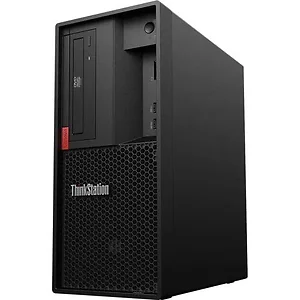
Designed for acceleration, the ThinkStation P330 Tower delivers mind-blowing speeds of up to 4.2 GHz, with the latest generation of Intel® Xeon® or Intel Core™ vPro processors boasting up to 8 cores per CPU. Combined with optional Intel Optane™ memory and ISV certifications, this workstation is speedy.
Supporting up to NVIDIA® Quadro® P5000 graphics and select RTX cards, the ThinkStation P330 Tower is certified VR-ready by NVIDIA. This entry-level system lets you create virtual reality content at a low cost. Additionally, this workstation includes ISV certification from all the major vendors including Autodesk®, Bentley®, Dassault®, PTC®, and Siemens®.
With the Lenovo Performance Tuner, it’s a cinch to get the most out of your ThinkStation P330 Tower. Simply download the free software, and choose a focus area: Processor Affinity (which lets you designate an app to run on specific cores), Power Management, Resource Monitoring and Tuning, Graphics Management, and BIOS Management. There’s a tutorial to help get you started and the interface is highly intuitive.
Lenovo 30CY001NUS TOPSELLER TS P330 TWR I7-9700